


RTSP stands for Real-Time Streaming Protocol. In a WiFi camera, it is used to establish and control access to a real-time video or audio stream over a network. A simple way to understand RTSP is to think of it as a digital remote control for the camera stream: it tells the system when and how to start, manage, or stop a streaming session.
RTSP is not a video format such as H.264 or H.265. Its main value is that it can let compatible third-party software, NVRs, VMS platforms, and other systems access a camera feed directly. For a broader introduction to wireless camera architecture, see our guide to how a WiFi hidden camera works.

What Is RTSP in a WiFi Camera?
A WiFi camera uses wireless networking to connect to a router or local network. RTSP is a separate network protocol that operates over that connection to manage media streaming sessions.
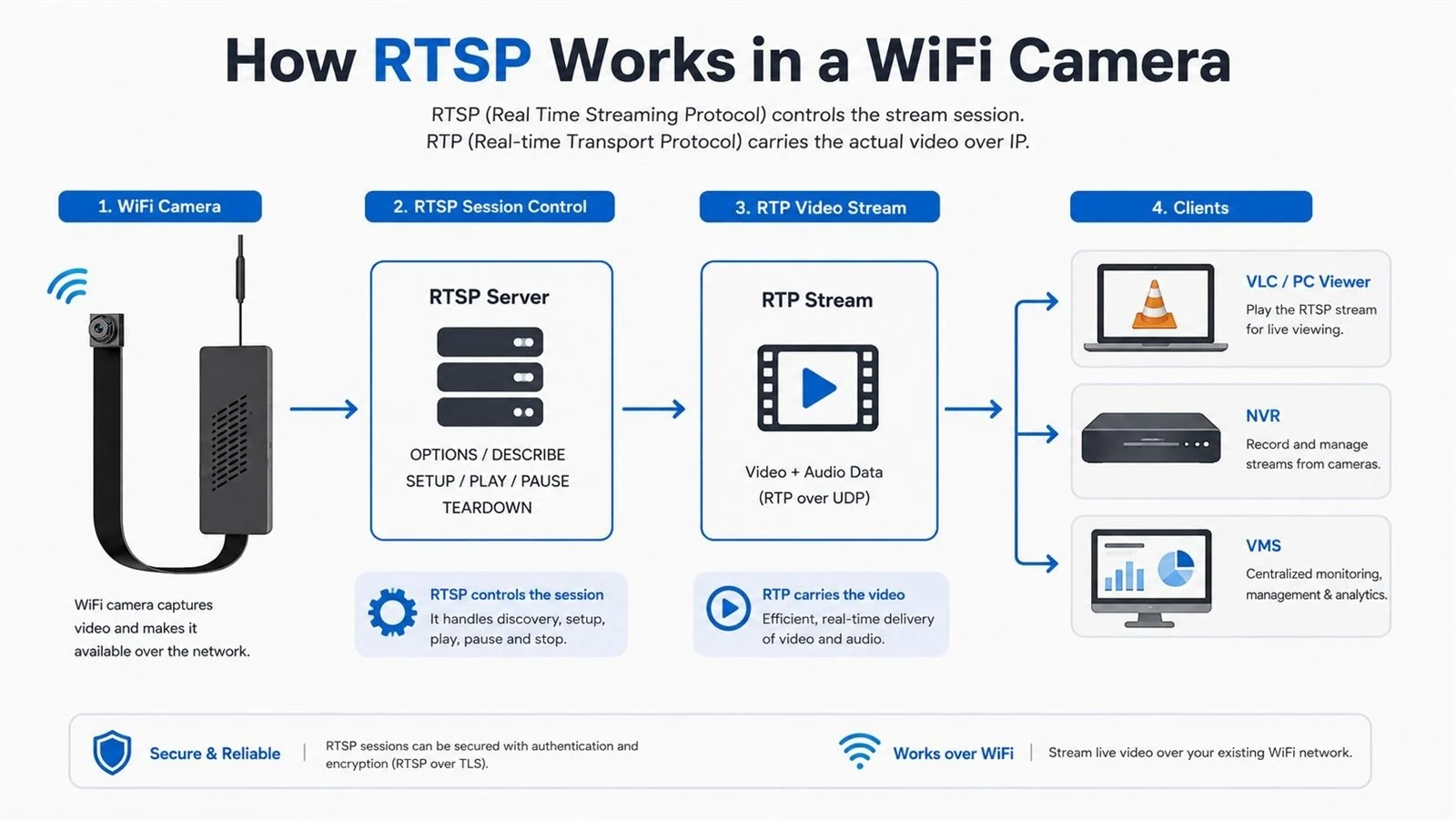
Several technologies work together inside a network camera:
WiFi provides the network connection.
H.264 or H.265 compresses the video.
RTSP establishes and controls the streaming session.
RTP commonly carries the actual real-time audio and video data.
So an RTSP WiFi camera is not using RTSP instead of WiFi. WiFi connects the device to the network, while RTSP provides a standardized way for compatible clients to request and control its media stream.
This distinction is also important when comparing codecs. RTSP does not replace video compression, and the choice between H.264 and H.265 affects bandwidth and storage independently of RTSP. Our comparison of H.264 vs H.265 for security cameras explains that difference in more detail.
A WiFi camera can also work normally through a manufacturer's App without supporting RTSP. RTSP is an additional integration capability, not a requirement for every wireless camera.
How Does RTSP Work in a WiFi Camera?
An RTSP camera usually acts as the media source or server. A client such as VLC, an NVR, or video management software requests access to the stream.
RTSP manages that session through commands rather than carrying the compressed video itself.
RTSP vs RTP and RTCP
These three technologies are related but perform different jobs.
|
Technology |
Main Role |
|
RTSP |
Establishes and controls the media streaming session |
|
RTP |
Commonly carries the actual real-time audio/video packets |
|
RTCP |
Provides statistics, status, and quality-related feedback for an RTP session |
The simplest distinction is:
RTSP controls the stream; RTP commonly carries the media.
A Typical RTSP Session
A typical communication process may include:
OPTIONS - the client checks which RTSP methods the camera supports.
DESCRIBE - the client requests information about the available media.
SETUP - the client and camera establish the transport parameters.
PLAY - the client asks the camera to start streaming.
Media transmission - video and audio data are delivered to the client.
TEARDOWN - the session is closed.
Users normally never see these commands. The player, NVR, or VMS handles them automatically after the correct RTSP address and credentials are entered.
What Does an RTSP URL Look Like?
An RTSP URL is the network address a compatible client uses to request a camera stream.
A common structure looks like this:
rtsp://username:password@camera-ip:554/stream-path
Each section has a specific purpose:
|
URL Part |
Example |
Purpose |
|
Protocol |
rtsp:// |
Identifies the RTSP connection |
|
Username / password |
admin:password |
Authenticates the client where required |
|
Camera IP |
192.168.1.100 |
Identifies the camera on the network |
|
Port |
554 |
Common RTSP service port |
|
Stream path |
/stream1 |
Identifies a specific video stream |
Port 554 is commonly used for RTSP, but it is not mandatory for every device configuration.
There is also no universal RTSP stream path. The correct address depends on the camera manufacturer, model, firmware, and stream configuration. Some devices provide separate URLs for a high-resolution main stream and a lower-bandwidth sub stream.
If you first need to identify the device on your local network, our guide on how to find a camera IP address covers several practical methods.

What Can You Use RTSP for on a WiFi Camera?
RTSP becomes especially useful when a camera needs to work outside a closed manufacturer-specific App ecosystem.
Live Viewing With VLC or Other Software
A compatible RTSP stream can be opened in software such as VLC Media Player or FFmpeg-based tools. This is useful for testing the camera feed, displaying live video on a computer, or integrating the camera into custom software.
For developers and system integrators, direct stream access also makes it easier to build monitoring dashboards and local applications.
NVR, NAS, and VMS Integration
One of the most important uses of RTSP in security cameras is integration with recording and management systems.
An RTSP-capable camera may provide a stream to:
a Network Video Recorder (NVR);
compatible Network Attached Storage (NAS) software;
a Video Management System (VMS);
another third-party monitoring or recording platform.
This can reduce dependence on a single mobile App and make a camera easier to integrate into an existing security system.
It can also support local recording architectures. If storage design is part of your project, the differences between local storage and cloud storage for hidden cameras are worth considering alongside RTSP and NVR compatibility.
RTSP support alone, however, does not guarantee compatibility with every NVR or VMS. The receiving system must also support the camera's stream configuration, codec, authentication method, and other relevant parameters.
Smart Home and Video Analytics
RTSP streams can also serve as video sources for smart-home dashboards and computer-vision systems.
Compatible software can receive an RTSP camera stream and then perform motion analysis, object detection, or other AI-based processing.
RTSP itself does not provide AI analytics. It simply gives the analytics system access to the video source.
For projects requiring direct integration rather than a finished consumer form factor, a DIY WiFi hidden camera module is one example of the type of platform that may be evaluated for customized hardware and software requirements. RTSP availability should always be confirmed for the specific model or ODM configuration.
RTSP vs ONVIF: What Is the Difference?
RTSP and ONVIF are often mentioned together in IP camera specifications, but they solve different problems.
|
Feature |
RTSP |
ONVIF |
|
Primary purpose |
Media stream/session control |
Interoperability between network video devices |
|
Video access |
Yes |
Can standardize access to media functions |
|
Device discovery |
Not its primary role |
Yes |
|
PTZ and event functions |
Not its main scope |
Can be included |
|
NVR/VMS integration |
Common use |
Common use |
|
Same technology? |
No |
No |
A practical way to remember the difference is:
RTSP is mainly about accessing and controlling a media stream. ONVIF is about helping compatible network video devices discover, configure, and work with each other.
A camera may support RTSP without supporting ONVIF. It may also support both.
Even ONVIF support does not mean every feature will work identically across every camera and recorder. Different devices may implement different functions or profiles, so compatibility should still be verified for the actual NVR or VMS being used.
RTSP Over TCP vs UDP
RTSP camera streaming can use different transport arrangements. TCP and UDP are the two most common technologies involved.
|
Transport |
Typical Characteristic |
|
UDP |
Low transport overhead, but packet loss can directly affect the stream |
|
TCP |
Reliable packet delivery, but retransmission and buffering can affect latency |
It is too simplistic to say that RTSP always uses TCP for control while video always uses UDP. Depending on the camera and client configuration, RTP media may use UDP or may be carried over a TCP connection.
This matters during troubleshooting. A stream that performs poorly over UDP on an unstable wireless network may behave differently when the client is configured to use TCP.
What Affects RTSP Streaming Performance Over WiFi?
RTSP does not make a weak wireless network reliable. The quality of an RTSP camera stream still depends heavily on the network underneath it.
Important factors include:
WiFi signal strength;
wireless interference;
available network bandwidth;
video resolution and bitrate;
frame rate;
TCP or UDP transport;
client buffering.
For reference, a 1080p H.264 camera stream may commonly use around 2–4 Mbps under many configurations. Actual bandwidth can be lower or substantially higher depending on image complexity, frame rate, bitrate settings, and encoder configuration.
RTSP is also commonly associated with relatively low-latency viewing. On a well-configured local network, latency can sometimes remain in the sub-second to roughly one-second range, although actual results vary by device and network.
If a stream is unstable, reducing bitrate or resolution may help, but the underlying WiFi connection should be checked first. Our guide to what affects WiFi camera range covers signal strength, obstacles, interference, and other wireless factors in more detail.
Common RTSP Problems and Security Tips
RTSP problems are often caused by configuration or network conditions rather than the protocol itself.
Common RTSP Connection Problems
|
Problem |
What to Check |
|
Cannot connect |
Camera IP, RTSP URL, credentials, RTSP enablement |
|
No video |
Stream path, port, codec, firmware configuration |
|
Stream freezes or breaks up |
Weak WiFi, interference, packet loss, excessive bitrate |
|
VLC works but NVR does not |
Codec, authentication, NVR compatibility |
|
High latency |
WiFi quality, buffering, bitrate, stream configuration, transport mode |
There is no single UDP port range or stream path that applies to every RTSP camera. Firewall and network settings should always be checked against the actual device configuration.
For users setting up remote monitoring for the first time, this hidden camera remote viewing setup guide explains the broader relationship between WiFi connectivity, mobile access, and remote viewing.
Basic RTSP Security
RTSP should be treated as a network service that needs protection.
Use strong camera credentials, change default passwords, and keep camera firmware updated. Avoid exposing an unprotected RTSP service directly to the public internet.
For remote access, a properly secured network architecture is preferable to simply forwarding an RTSP port from the router to the camera.
RTSP Camera FAQ
Does Every WiFi Camera Support RTSP?
No. Some WiFi cameras provide video only through their own App, P2P service, or cloud platform. RTSP support must be confirmed for the specific model.
Allcam offers multiple WiFi spy camera form factors for different security and OEM applications, but streaming protocols and integration functions should always be checked at the model or project level.
Is RTSP the Same as H.264 or H.265?
No. RTSP is a media session protocol, while H.264 and H.265 are video compression codecs. An RTSP stream can carry video encoded using H.264 or H.265.
Can an RTSP Camera Work With Any NVR?
Not necessarily. Both devices must support compatible codecs, authentication, stream parameters, and integration requirements. RTSP support improves integration options, but it does not guarantee universal compatibility.
Can RTSP Work Without ONVIF?
Yes. RTSP and ONVIF are separate capabilities. A client can access an RTSP stream without ONVIF if the camera exposes an accessible RTSP stream and the client supports it.
What RTSP Means for a WiFi Camera
RTSP in a WiFi camera is best understood as a protocol for establishing and controlling real-time media streaming sessions. It gives compatible clients such as VLC, NVRs, VMS platforms, and other software a direct way to access the camera feed, while technologies such as H.264/H.265 and RTP handle other parts of video delivery.
For security brands and OEM projects, RTSP can be an important requirement when a WiFi camera needs to integrate with third-party recording, analytics, or monitoring systems.
Allcam develops WiFi and hidden camera solutions for security brands, distributors, and OEM/ODM projects. If your project requires RTSP, NVR/VMS integration, private-label software, or other customized camera functions, contact us to discuss the required hardware and software configuration.