


In recent years, hidden cameras have become increasingly common, appearing in various places ranging from hotel rooms to public restrooms. Secret cameras can invade people's privacy in multiple ways. Therefore, it is crucial to learn how to detect hidden cameras.
In this article, we will guide you on how to detect hidden cameras, explain what hidden cameras are, and tell you what to do if you discover hidden cameras. Keep reading to learn how to protect your privacy.
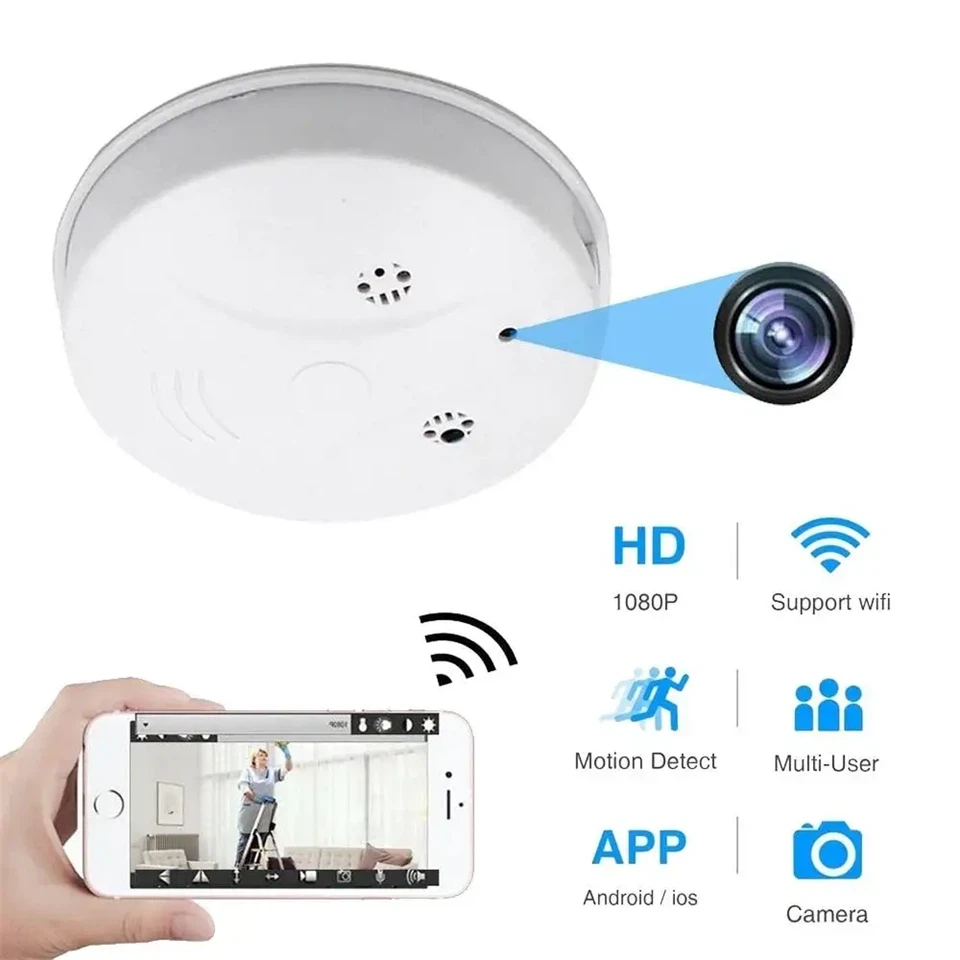
Where Are Hidden Cameras Usually Hidden?
In the field of covert surveillance, concealment is a craft refined over years. The design of modern hidden cameras allows them to blend seamlessly into everyday objects, many of which are so commonplace that users rarely question their presence. Based on engineering practices and field reports, the following locations should always be inspected thoroughly upon entering a vacation rental.
Smoke detectors are among the most frequently exploited hiding spots. Their elevated position provides a wide field of view, while the casing allows enough internal space to house compact lens modules and power supplies. Any detector with visible lenses or subtle LED flickers should be considered suspicious.
Wall outlets and USB chargers are often modified to conceal pinhole cameras. Since these are expected in any rental for guest convenience, tampered versions rarely arouse suspicion. A simple external scan might not suffice-look for any unusual screws, off-color plastic, or holes that appear to be sensors.
Wi-Fi routers and modems may contain built-in surveillance capabilities or could house separate camera modules disguised within the casing. If the router is not a recognized brand or seems out of place (e.g., hidden on a shelf facing the bed), further inspection is warranted.
Alarm clocks, air purifiers, and digital displays are also commonly altered to house micro-cameras. Check for overly reflective surfaces, unused ports, or inconsistencies in manufacturing quality. Many off-brand devices sold online for this purpose look legitimate at first glance.
Mirrors, especially those in private areas like bathrooms or bedrooms, are worth special attention. Two-way mirrors, where one side appears reflective while the other is transparent, can conceal cameras behind them. We'll discuss methods to detect these shortly.
Toys such as teddy bears or decorative figurines may sound innocent but are frequently used as camera housings, particularly in family-oriented rentals. Focus on the eyes of dolls or any small openings on the surface.
Ventilation grills, picture frames, and decorative lamps round out the list of common locations. Any device facing key activity zones-like beds, showers, or desks-should be investigated.

7 Proven Methods to Detect Hidden Cameras
Modern surveillance devices are small, silent, and cleverly hidden. That said, even the most advanced cameras leave behind signals or signs that can be identified with the right techniques. The following methods offer both no-cost and professional-level approaches suitable for varying degrees of concern and technical comfort.
-
Do a Visual Inspection
Start with a systematic walk-through of the rental. Observe all areas from multiple angles and lighting conditions.
- Check for objects positioned to face private areas-particularly anything at eye-level or higher.
- Look for small holes, glassy reflections, or unusual wires, especially on household electronics.
- Pay attention to duplicated items (e.g., two smoke detectors in the same room), as the extra unit might be a decoy.
This step requires patience. Anomalies may not be obvious at first glance but become apparent when examined carefully.
2. Use Your Phone's Camera to Detect Infrared Light
Many hidden cameras use infrared (IR) for night vision. Most smartphone front-facing cameras lack an IR filter, making them more sensitive to IR light than rear cameras.
To test:
- Turn off all lights and close the curtains.
- Open your phone's front camera.
- Slowly pan the room while looking for small, pulsating or static white/purple dots. These are potential IR sources.
- You can also test your phone's IR detection ability by pointing a TV remote at the camera and pressing any button.
This method is effective against night-vision-equipped cameras, especially in low-light setups designed for discrete surveillance.
3. Scan the Room with a Flashlight
Use a flashlight or your phone's LED in a darkened room. Slowly sweep it across:
- Ceiling corners
- Decorative objects
- Vents and electronics
If a lens is present, it may reflect light back as a pinpoint glare-similar to how animal eyes reflect light in darkness. Always check from different angles, as reflections depend heavily on the line of sight.
4. Check the Wi-Fi Network for Unknown Devices
If you have access to the rental's Wi-Fi, network scanning tools like Fing (iOS/Android) or Wireless Network Watcher (Windows) can help detect connected devices.
Steps:
- Scan the network for active devices.
- Flag unfamiliar names (e.g., "IPCAM_23F8", or devices with no manufacturer info).
- Disconnect your own devices to isolate anything still connected.
- Keep in mind that some hosts may use a separate hidden network, so this method isn't foolproof.
This approach is effective primarily against wireless cameras that stream footage in real time.
5. Use a Professional RF or Lens Detector
Professional-grade detection tools fall into two categories:
- RF (Radio Frequency) Detectors: Detect wireless signal emissions from cameras transmitting data.
- Lens Detectors: Use a ring of red LEDs and optical filters to detect lens reflections, even from passive (non-transmitting) cameras.
For casual travelers, entry-level detectors ($30–$80) may suffice in small rooms. For larger spaces or higher-risk contexts, consider dual-mode devices that combine RF and lens detection, even at distances of 10–15 feet.
Note: Turn off known RF-emitting devices (e.g., phones, smart TVs) during scans to reduce interference.
6. Inspect Vents, Mirrors and Decorative Items
Two-way mirrors can look like regular mirrors but may hide cameras on the other side. Use the fingernail test:
- Place your fingernail against the mirror.
- If there's a visible gap between your nail and its reflection, it's a standard mirror.
- If the nail appears to directly touch its reflection, it might be a two-way mirror.
Additionally:
- Tap the mirror-real ones produce a dull sound, while two-way glass may sound hollow.
- For objects like plants, figurines, or clocks, inspect any unusually placed holes or dark spots resembling pinholes.
7. Use Apps to Help You Detect Cameras
Numerous mobile apps are available to assist with camera detection. These use combinations of magnetic field sensors, network scanners, or simple lens reflection aids.
Recommended apps include:
- Hidden Camera Detector (Android/iOS)
- Glint Finder (Android)
- Spy Hidden Camera Detector Pro (iOS)
While these tools can provide a first-level scan, they should not be used as the only verification method. App-based tools can misinterpret wireless signals from non-camera devices.
What to Do If You Find a Hidden Camera
Discovering a hidden camera can be alarming-but panic may compromise your ability to document and respond appropriately.
Here's what to do:
- Do not tamper with the device. Avoid turning it off, covering it, or attempting to remove it.
- Document everything. Take high-resolution photos and videos of the device in context. Capture close-ups of serial numbers or indicator lights if visible.
- Exit the camera's field of view and secure private belongings.
- Report immediately to the rental platform. Most platforms (e.g., Airbnb) have urgent relocation or compensation procedures in place.
- Contact local law enforcement. Use precise language like: "I discovered an unauthorized surveillance device in a private area of my rental."
- Consult a legal expert especially in jurisdictions with strict privacy laws.
These steps are critical to protect your legal standing and ensure that the incident is properly investigated.
Are Cameras Even Allowed in Vacation Rentals? (Know Your Rights)
Many guests assume that any camera found indoors is automatically illegal. While hidden or undisclosed cameras are indeed problematic, the legal landscape is more nuanced. Understanding both platform policies and local laws is essential for protecting your privacy and responding appropriately when issues arise.
Rental Platform Policies
Airbnb
As of April 30, 2024, Airbnb has implemented a blanket ban on all indoor cameras, regardless of whether they are disclosed. This includes common areas such as living rooms and kitchens. The decision reflects growing concern about guest privacy and is a significant step toward industry-wide reform.
Vrbo
Vrbo takes a slightly different stance. Indoor cameras are not permitted, unless they are non-remote-activated smart devices, such as offline voice assistants or motion detectors. If present, these devices must be fully disclosed in the property listing and offer an option to disable them.
In practice, platform enforcement varies. While Airbnb has formalized strict bans, some hosts may still violate the policy. That makes guest vigilance essential-even in supposedly compliant listings.
Legal Boundaries: What's Allowed and What's Not
The federal legal framework in the United States is built around the concept of a "reasonable expectation of privacy." This means that:
- Bedrooms, bathrooms, and dressing areas are always considered private spaces. Any form of surveillance here-with or without disclosure-is unlawful.
- Living rooms, kitchens, hallways, or entry areas are considered semi-public, especially in shared rentals. However, disclosure is typically required.
- Audio recording laws are often stricter than video surveillance. In many U.S. states, both parties must consent to being recorded.
Some jurisdictions have introduced specific penalties for hidden camera surveillance:
- In South Carolina, for example, installing a hidden camera in a bedroom or bathroom without consent is categorized as a felony, potentially carrying prison time.
- Several states, including California and New York, have enacted consumer protection laws that make the unauthorized use of surveillance equipment in rentals a civil offense, subject to fines or lawsuits.
- If you're traveling internationally, always review local laws beforehand-what's legal in one country may be a serious offense in another.
How to Prevent Hidden Camera Risks in the Future
While detection is critical, prevention begins before you ever enter the property. As a surveillance engineer, I've always maintained that the most effective privacy protection involves proactive awareness and reasonable skepticism.
Here are practical steps you can take:
Before You Book
Read the entire listing, including fine print. Disclosures about surveillance devices are often buried in text. Search keywords like "monitoring," "security," or "smart device."
Check the property photos for telltale signs. Zoom into smoke detectors, wall clocks, or anything facing a bed or bathroom.
Contact the host directly. Ask:
- Are there any cameras on the property?
- If so, where are they located?
- Are they active during my stay?
Review guest feedback. Prior reviews may mention privacy concerns that the platform's listing doesn't reveal.
Immediately After Arrival
- Perform a systematic room inspection, especially in bedrooms and bathrooms.
- Use your phone to conduct quick infrared and lens reflection scans, as described earlier.
- Scan the Wi-Fi network if accessible, and isolate unfamiliar devices.
Recommended Travel Tools
Investing in portable detection tools can provide peace of mind:
- Lens Detectors: Affordable models are compact, USB-rechargeable, and effective at close range.
- RF Signal Detectors: Useful for identifying wireless devices emitting signals within 1–10 meters.
- Thermal Imaging Apps (paired with external sensors): These can detect heat signatures from powered camera modules, especially those embedded in walls or ceilings.
While these tools are not foolproof, their combined use greatly increases your chances of identifying surveillance devices that may otherwise go unnoticed.
Conclusion
In this article, we have summarized some common methods for detecting hidden cameras. We hope you find them useful! We recommend that when traveling or staying in a hotel, you should be aware of the potential risks of privacy monitoring that may exist. If you want to learn more about hidden nanny camera information, please email us. ( postmaster@spycam123.com )
