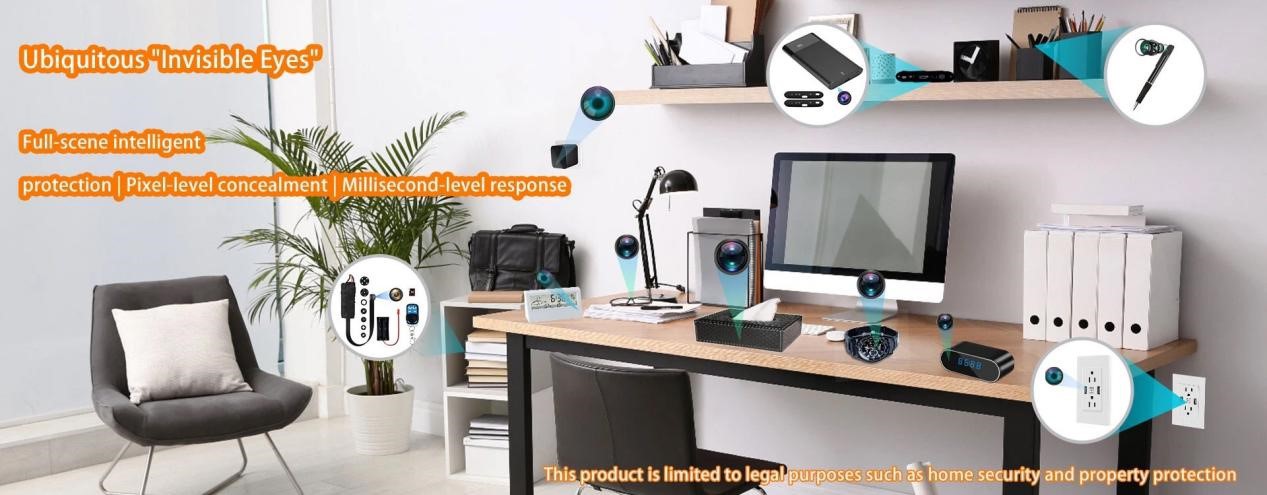
Hidden spy cameras are small surveillance cameras designed to be concealed inside objects, fixtures, or building structures. They may be hidden in a USB charger, smoke detector, alarm clock, wall outlet, mirror frame, router, air purifier, or other everyday item. Some transmit video through WiFi or radio frequency signals. Others record locally to a microSD card and leave no obvious network trace.
This guide walks through practical detection steps based on how actual hidden cameras operate. We focus on methods that work in real hotel rooms and Airbnbs, starting with zero-cost techniques and moving to tools that deliver better accuracy. No single method catches everything, which is why experienced users combine several.

Why Detecting Hidden Cameras Matters
Most hidden cameras need power and a clear view of private areas. They rarely run on long-life batteries, so installers place them near outlets or inside powered objects. Privacy violations in rentals or hotels often target bedrooms and bathrooms because those spaces yield the footage people pay for on illegal markets.
Legal consequences exist in most countries, including China and the US. Installing a camera without consent usually counts as illegal surveillance. Finding one gives you evidence, but only if you handle it correctly.
The point is simple: a quick, systematic check takes ten to fifteen minutes and removes most uncertainty. Relying on hope leaves you exposed.
Common Hiding Places for Spy Cameras
Hidden cameras succeed when they blend into everyday objects. Installers target spots with good sightlines to beds, sofas, or showers.
Focus first on these high-risk areas and items:
- Smoke detectors, especially wall-mounted ones aimed at the bed instead of the ceiling
- Digital alarm clocks or weather stations on nightstands
- USB wall chargers, power outlets, or adapters with no visible cables attached
- Picture frames, wall décor, or tissue boxes
- Air purifiers, AC vents, or light fixtures
- Stuffed animals, hooks, or toiletries in bathrooms
- Mirrors positioned unusually low or facing private zones
Look for physical clues. Tiny pinholes in plastic or fabric, wires that serve no obvious purpose, or devices placed at odd angles. Many cameras still need a power source, so anything plugged in without a clear reason deserves closer attention.
Unplug suspicious items temporarily. If the room feels normal afterward, that device was likely the concern. This quick filter saves time before you move to optical or signal checks.
How to Detect Hidden Cameras: 7 Proven Methods
Hidden camera detection combines three layers: physical inspection, optical detection, and signal analysis. Start with your eyes and a phone. Move to dedicated tools only when those steps raise questions.
1. Physical and Logical Inspection
Walk the room and think like someone who wants to record without being noticed. Prioritize bedrooms and bathrooms. Scan for objects that face private spaces or look slightly out of place.
Run your hand over suspicious devices. Active electronics often feel warm after running for a while. Check for small holes, loose panels, or wires tucked awkwardly.
Practical step: Unplug anything that seems unnecessary and set it aside. Cover lenses you cannot identify with a towel or tape for the moment. This method catches obvious fakes quickly but misses well-built units.
2. Flashlight Lens Reflection Test
Camera lenses act like small mirrors. In complete darkness they reflect light back sharply.
Close curtains, turn off all lights, and use your phone flashlight or a bright torch. Sweep slowly across surfaces at different angles. Look for a sharp glint or pinpoint reflection - often blue or purple. Some models show a tiny red or green LED in standby.
Move methodically. Rushing causes you to miss faint reflections. This low-tech approach works surprisingly well on pinhole lenses but fails in bright rooms or with anti-reflective coatings.
3. Smartphone IR Detection
c use infrared for night vision. Your phone camera can pick up IR light that your eyes cannot see.
In a dark room, open the camera app and scan with both front and rear cameras. Bright white, red, or purple dots that do not appear to the naked eye often indicate IR LEDs. Older phones without strong IR filters tend to perform better.
Test your phone first by pointing a TV remote at it and pressing buttons. If you see flashing light on screen, the camera detects IR. Not every hidden camera emits IR constantly, so treat positive results as a flag for further checking rather than final proof.
4. Wi-Fi Network Scanning
Wireless cameras usually connect to the local network to stream footage.
Download Fing or WiFiman. Scan the network and look for unfamiliar devices with names containing "IP_CAM", "ESP32", "Wireless Camera", or random strings. Check MAC addresses and manufacturer details when available.
In hotels or Airbnbs you cannot access the router admin panel, so app-based scans become essential. Keep in mind some cameras record locally to SD cards and never appear on Wi-Fi. Printers and other legitimate devices can also show up as unknowns. This method is fast but incomplete on its own.
5. Phone Signal Interference Test
Wireless transmission can disrupt phone calls in close proximity.
Make a call and walk slowly around the room while listening. Buzzing, crackling, or sudden drops in quality near a specific object may indicate active RF transmission.
This test is rough and easily affected by normal Wi-Fi or cellular signals. Use it only as supporting evidence alongside other methods.
6. RF Signal Detection
A dedicated RF detector picks up radio frequencies emitted by wireless cameras and transmitters.
Turn off known wireless devices (router, TV, smart speaker) to reduce false positives. Sweep slowly across common hiding spots: smoke detectors, clocks, outlets, vents. The device beeps, vibrates, or lights up more intensely as you approach the source.
Models with adjustable sensitivity and dual RF + magnetic field detection handle both wireless and wired cameras better. Some include a lens-finder mode with red LED that highlights lens reflections through a viewing port.
RF detectors give clearer direction than phone apps, yet they still require confirmation with visual inspection.
7. Advanced Tools and Special Checks
For higher confidence, combine professional tools.
Lens finders use strong LEDs or lasers to illuminate hidden lenses. Thermal imagers detect heat signatures from active electronics, though they only work on powered devices. Two-way mirror checks involve pressing a fingertip to the glass - no gap between finger and reflection can indicate a see-through mirror, but modern glass designs make this test less reliable alone. Always cross-check with flashlight or RF.
Here is a quick comparison of the main approaches:
|
Method |
Cost |
Skill Level |
Reliability |
Best For |
Main Limitation |
|
Physical Inspection |
Free |
Low |
Medium |
Quick initial sweep |
Misses well-hidden units |
|
Flashlight Reflection |
Free |
Low |
Medium-High |
Lens detection |
Needs dark room |
|
Smartphone IR |
Free |
Low |
Medium |
Night vision LEDs |
Varies by phone model |
|
Wi-Fi Scanning |
Free/Low |
Low |
Medium |
Wireless network devices |
Misses offline/SD card cameras |
|
RF Detector |
Medium |
Medium |
High |
Wireless signals |
False positives possible |
|
Advanced (Lens/Thermal) |
High |
Medium-High |
High |
Confirmation & hard cases |
Expensive, overkill for most users |
Choose based on your travel frequency and comfort with tools. Frequent travelers often carry a basic RF detector plus phone apps.

What to Do If You Find a Hidden Camera
Stay calm and preserve evidence. Do not touch or move the device. Take clear photos and videos showing its exact location, surrounding objects, and any wires or power connection.
If safe, cover the lens with opaque tape to stop recording immediately. Contact hotel staff or the Airbnb host right away, then report to local authorities with your documentation. Keep copies of all communication.
In many places, platforms like Airbnb have strict policies against undisclosed cameras. Proper reporting protects you and others.
Prevention Tips for Future Stays
Develop a routine. Upon entering any rental, spend the first few minutes on a structured sweep: unplug questionable devices, scan with flashlight and phone, then run a network check.
Carry a compact RF detector if you travel often. For longer stays, consider your own portable camera system from a reputable manufacturer for transparent monitoring. Choose accommodations with clear camera disclosure policies when possible.
Consistent habits reduce risk more effectively than any single tool.
Conclusion
Finding hidden spy cameras comes down to systematic checking rather than relying on one magic solution. Combine physical inspection, optical tests, and signal detection for the best results in real-world hotel and Airbnb environments.
At Hytech we design concealed cameras for legitimate security and monitoring applications. If you need reliable detection equipment or professional-grade hidden surveillance solutions built to proper standards, explore our range on the site. Understanding both sides of the technology helps you stay protected.
Drop a comment with your own detection experiences or questions. Staying informed keeps privacy risks manageable.