


As a manufacturer of covert surveillance equipment, we understand that video quality is one of the most critical factors when choosing a hidden camera. But what many users don't realize is that resolution alone doesn't determine clarity-bitrate plays an equally important role. In this comprehensive guide, we'll explain how bitrate affects your hidden camera's performance and how to optimize it for your specific needs.
Understanding Bitrate: The Hidden Factor in Video Quality
Bitrate, measured in bits per second (bps), refers to the amount of data processed per unit of time in your video stream. Think of it as the "information pipeline" that carries visual details from your hidden camera to the recording device or viewer.
Why does bitrate matter for hidden cameras? Unlike standard security cameras, covert devices often face unique challenges:
- Limited physical space for components
- Power constraints (especially battery-operated models)
- Discreet wireless transmission requirements
- Need for extended recording times
These factors make bitrate optimization particularly crucial for hidden surveillance equipment.
The Bitrate-Quality Connection: Why Your 1080p Camera Might Look Blurry
You've probably seen hidden cameras advertised as "1080p Full HD" but wondered why the footage sometimes appears pixelated or contains artifacts. Here's the explanation:
Resolution vs. Bitrate: Two Different Quality Factors
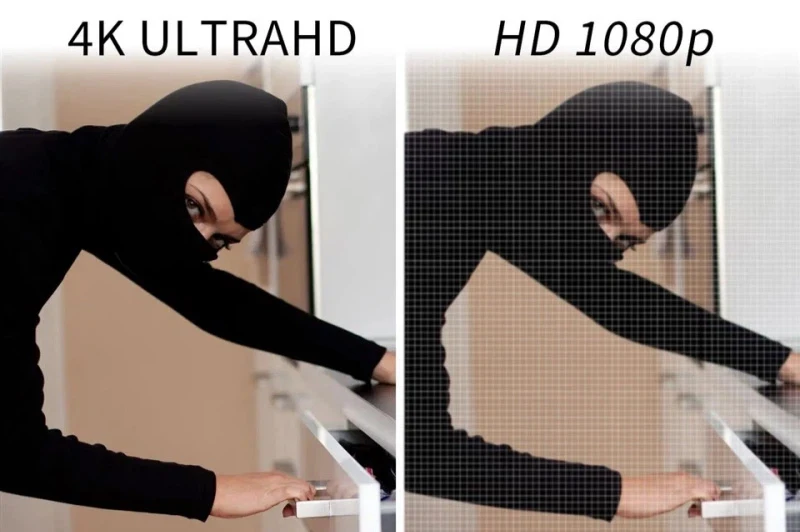
While resolution determines how many pixels make up your image (e.g., 1920x1080 for 1080p), bitrate determines how much detail each of those pixels can contain. A high-resolution camera with insufficient bitrate is like having a large canvas with only a few colors-the potential is there, but the execution falls short.

Common Bitrate-Related Quality Issues in Hidden Cameras
- Blocky Artifacts: When bitrate is too low, the compression algorithm groups similar pixels together, creating visible blocks in areas of motion or detail.
- Blurry Motion: Fast movement requires more data to maintain clarity. Low bitrate settings often result in smeared or indistinct motion.
- Loss of Fine Details: Facial features, license plates, or text become harder to distinguish when bitrate is inadequate.
- Noise Amplification: In low-light conditions, insufficient bitrate exacerbates graininess and visual noise.
Choosing the Right Bitrate for Your Hidden Camera
Recommended Bitrate Ranges for Common Hidden Camera Scenarios
|
Camera Type |
Resolution |
Recommended Bitrate |
Best For |
|
Mini Pen Cameras |
720p |
1.5-2.5 Mbps |
Discreet recording, battery saving |
|
Wall Clock Cams |
1080p |
3-5 Mbps |
General indoor monitoring |
|
Smoke Detector Cams |
2K |
6-8 Mbps |
High-detail areas like cashiers |
|
Outdoor Covert Cams |
1080p |
4-6 Mbps |
Weather-resistant surveillance |
|
Wireless Spy Cams |
1080p |
2.5-4 Mbps |
WiFi/battery-operated setups |
Note: These ranges assume H.264 encoding. For H.265/HEVC, you can reduce bitrate by 30-50% while maintaining similar quality.

Factors That Affect Your Ideal Bitrate Setting
1. Purpose of Surveillance:
- Evidence collection: Higher bitrate (upper end of ranges)
- General monitoring: Moderate bitrate
- Motion-triggered recording: Can use variable bitrate
2. Scene Complexity:
- Static environments (empty rooms): Lower bitrate acceptable
- High-activity areas (retail stores): Need higher bitrate
3. Lighting Conditions:
Night vision modes often require higher bitrates to maintain clarity
4. Storage and Power Constraints:
SD card capacity and battery life may necessitate bitrate compromises
The Storage-Bandwidth-Battery Triangle: Finding the Balance
One of the biggest challenges with hidden cameras is balancing video quality with practical limitations:
1. Bitrate vs. Storage Space
Higher bitrate means:
- More detailed footage
- Faster filling of storage media
- Example: A 1080p camera at 4Mbps will fill a 32GB card in about 17 hours, compared to 34 hours at 2Mbps
Solution: Use motion-activated recording or scheduled recording to extend storage duration without sacrificing critical footage quality.
2. Bitrate vs. Wireless Transmission
For WiFi hidden cameras:
- Higher bitrates require stronger, more stable signals
- May cause lag or disconnections in areas with interference
- Increased power consumption during transmission
Solution: For wireless models, consider:
- Lower bitrate for real-time viewing
- Higher bitrate for local recording only
- Dual-stream technology (high quality for recording, lower quality for live view)
3. Bitrate vs. Battery Life
Our tests show:
- A 1080p hidden camera at 5Mbps lasts ~6 hours on a 1200mAh battery
- The same camera at 3Mbps lasts ~9 hours
- At 1.5Mbps, runtime extends to ~14 hours
Solution: For extended battery operation:
- Use moderate bitrate (3-4Mbps for 1080p)
- Implement smart motion detection to record only when needed
- Consider cameras with external power options
Advanced Bitrate Optimization Techniques
1. Variable Bitrate (VBR) vs. Constant Bitrate (CBR)
- CBR: Maintains steady data rate-best for consistent streaming quality but wastes bandwidth on simple scenes
- VBR: Adjusts bitrate based on scene complexity-more efficient but can cause quality fluctuations
- Our recommendation: Use VBR for most hidden camera applications, as it provides better quality within limited storage/bandwidth.
2. Codec Selection
Modern hidden cameras often support multiple codecs:
- H.264: Widely compatible, good balance
- H.265 (HEVC): ~50% more efficient, but requires more processing power
- MJPEG: Simple, but inefficient-avoid for continuous recording
3. Frame Rate Considerations
Standard frame rates for hidden cameras:
- 15fps: Minimum for basic monitoring
- 24-25fps: Smooth motion, good balance
- 30fps+: Only needed for very fast action
Pro Tip: Reducing frame rate from 30fps to 15fps allows ~30% bitrate reduction with minimal impact on surveillance effectiveness.
Troubleshooting Common Bitrate-Related Issues
Problem: "My 1080p hidden camera footage looks worse than my 720p camera"
Likely Causes:
- Bitrate set too low for the higher resolution
- Insufficient lighting causing compression artifacts
- Poor quality compression algorithm
Solutions:
- Increase bitrate settings if storage/bandwidth allows
- Improve lighting conditions
- Check if H.265 encoding is available (more efficient)
Problem: "Video becomes pixelated when there's movement"
Solution:
- Enable "Motion-Adaptive Bitrate" if your camera supports it
- Increase the bitrate by 1-2Mbps
- Ensure adequate bandwidth for wireless models
Problem: "My SD card fills up too fast"
Solutions:
- Implement motion-activated recording
- Reduce bitrate slightly (test quality impact first)
- Use larger capacity cards (128GB+)
- Format cards regularly to prevent fragmentation
Future Trends: What's Next for Hidden Camera Bitrate Technology
1. AI-Assisted Bitrate Optimization:
- Emerging cameras can analyze scenes and dynamically adjust compression
- Prioritizes important details (faces, text) while aggressively compressing less important areas
2. Improved Low-Light Compression:
Special algorithms to reduce noise without increasing bitrate demands
3. Edge Computing:
- On-camera processing to pre-analyze footage before compression
- Reduces bandwidth needs while preserving critical details
Conclusion: Bitrate Matters as Much as Resolution
When evaluating hidden cameras, don't just look at the resolution specs-bitrate plays an equally vital role in determining real-world video quality. The "best" bitrate depends on your specific needs:
- For critical evidence collection: Prioritize higher bitrates (upper end of recommended ranges)
- For extended covert operations: Find the minimum bitrate that still captures necessary details
- For wireless/battery-powered cameras: Balance quality with operational duration
Remember that modern compression technologies like H.265 and smart bitrate adjustment features can help overcome many traditional limitations. When in doubt, test your camera in real-world conditions and adjust settings accordingly.
By understanding and properly configuring bitrate, you can ensure your hidden camera captures clear, usable footage while maximizing storage efficiency and operational duration-the perfect combination for effective covert surveillance.
Looking for a reliable hidden camera manufacturer?
Shenzhen Allcam Technology Co., Ltd., founded in 2014, has over 11 years of experience in custom hidden camera R&D and manufacturing. With in-house software, hardware, and structural design capabilities, we deliver 1080P hidden camera solutions built on advanced CMOS image sensors, optimized bitrate control, and stable video encoding. All products follow ISO 9001 quality standards, ensuring consistent performance, clear imaging, and long service life for OEM and ODM customers worldwide.
