

As a supplier of wireless USB charger Wi-Fi nanny cams, I've encountered numerous inquiries about optimizing the performance of these devices. In this blog post, I'll share some practical tips and insights based on my experience in the industry.
Understanding the Basics of Wi-Fi Nanny Cams and Wireless USB Chargers
Before delving into optimization techniques, it's essential to understand how Wi-Fi nanny cams and wireless USB chargers work. A Wi-Fi nanny cam is a surveillance camera that connects to your home network via Wi-Fi, allowing you to monitor your home remotely using a smartphone app or a web browser. On the other hand, a wireless USB charger uses electromagnetic induction to transfer power to the camera without the need for physical cables.
The combination of a Wi-Fi nanny cam and a wireless USB charger offers several advantages, including convenience, flexibility, and a clutter-free setup. However, to ensure optimal performance, you need to consider several factors, such as the camera's placement, the quality of the Wi-Fi signal, and the compatibility of the charger.
Optimizing the Camera Placement
The placement of your Wi-Fi nanny cam plays a crucial role in its performance. To get the best results, you should position the camera in a location that provides a clear view of the area you want to monitor. Avoid placing the camera near obstacles, such as walls, furniture, or curtains, as these can block the camera's view and reduce its effectiveness.
In addition to providing a clear view, the camera's placement should also ensure a strong Wi-Fi signal. Wi-Fi signals can be affected by various factors, such as distance, interference, and the presence of obstacles. To minimize these issues, you should place the camera as close to your Wi-Fi router as possible. If you have a large home or multiple floors, you may need to use a Wi-Fi extender or a mesh Wi-Fi system to ensure a strong signal throughout your home.
Improving the Wi-Fi Signal
A strong and stable Wi-Fi signal is essential for the optimal performance of your Wi-Fi nanny cam. To improve the Wi-Fi signal, you can take several steps, such as:
- Upgrading your router: If your router is old or outdated, it may not be able to provide a strong enough signal for your camera. Consider upgrading to a newer router that supports the latest Wi-Fi standards, such as 802.11ac or 802.11ax.
- Changing the channel: Wi-Fi routers operate on specific channels, and interference from other devices can cause signal degradation. You can use a Wi-Fi analyzer app to identify the least congested channel and change your router's channel accordingly.
- Reducing interference: Other devices, such as microwave ovens, cordless phones, and Bluetooth devices, can interfere with your Wi-Fi signal. To reduce interference, you should keep these devices away from your router and camera.
Choosing the Right Wireless USB Charger
The compatibility of your wireless USB charger is another important factor to consider when optimizing the performance of your Wi-Fi nanny cam. Not all wireless chargers are created equal, and using the wrong charger can cause issues such as slow charging, overheating, and reduced battery life.
When choosing a wireless USB charger for your camera, you should look for a charger that is specifically designed for your camera model. The charger should provide the correct voltage and amperage to ensure safe and efficient charging. You should also consider the charger's charging speed, compatibility with your camera's battery, and any additional features, such as overcharge protection and temperature control.
Updating the Camera's Firmware
Regularly updating the firmware of your Wi-Fi nanny cam is essential for maintaining its performance and security. Firmware updates often include bug fixes, performance improvements, and new features that can enhance the functionality of your camera.
To update the firmware of your camera, you can usually do so through the camera's smartphone app or a web browser. Make sure to check for updates regularly and install them as soon as they become available.
Additional Tips and Tricks
In addition to the above tips, there are several other things you can do to optimize the performance of your Wi-Fi nanny cam with a wireless USB charger. Here are some additional tips and tricks:
- Use a high-quality SD card: If your camera supports local storage, using a high-quality SD card can improve the camera's performance and reliability. Look for an SD card with a high read and write speed and a large storage capacity.
- Enable motion detection: Motion detection is a useful feature that can help you save storage space and reduce the amount of footage you need to review. You can configure the camera to send you alerts when motion is detected and record only when there is activity in the monitored area.
- Secure your network: To protect your privacy and security, it's important to secure your home network. Use a strong password for your Wi-Fi router, enable WPA2 or WPA3 encryption, and keep your router's firmware up to date.
Conclusion
Optimizing the performance of a Wi-Fi nanny cam with a wireless USB charger requires a combination of proper placement, a strong Wi-Fi signal, the right charger, and regular firmware updates. By following the tips and tricks outlined in this blog post, you can ensure that your camera provides reliable and high-quality surveillance of your home.

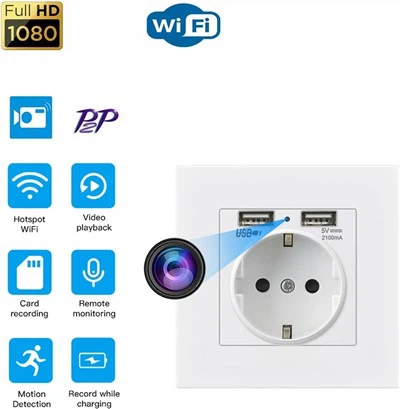
If you're interested in purchasing a wireless USB charger Wi-Fi nanny cam or have any questions about optimizing its performance, please feel free to [contact us for procurement discussions]. We're a leading supplier in this field, offering a wide range of products to meet your needs. You can also explore some of our other innovative products, such as the Wall Socket Hidden Camera, Small Body Cameras for Citizens, and Water Bottle Hidden Camera.
References
- Wi-Fi Alliance. (n.d.). Wi-Fi Standards. Retrieved from [Wi-Fi Alliance Website]
- Camera Manufacturer's User Manuals
- Online Forums and Communities for Wi-Fi Nanny Cam Users